
Proxmox VE The heart of my home lab environment
ESP32 Developed a multi-stage water filter monitoring system using ESP32 microcontroller that tracks filter status and reports data to a central server for real-time monitoring.
My Network Death by Networking
This Website Plans for this website.
Proxmox VE is an open-source server virtualization environment that allows you to run virtual machines and containers. I originally was using windows server with Hyper-V, but as I learned more about linux I found out that I liked it so much more than windows server. I use Proxmox as the backbone of my home lab environment, hosting various services and applications on virtual machines and containers. A total of 6 VMs and 4 LXCs are running on the Proxmox host at any given time. All are based on Ubunutu distrobutions with only a few that use a GUI.
Home Assistant is my most used service running on my server. It is an open-source home automation platform that allows you to control and automate various smart devices and services. I use Home Assistant to manage and automate my smart home devices, including the lights in my apartment (the switch in the fan for the lights is going out so I put smart lights in), Cameras, and sensors for my water filter monitoring system.
I run multiple SQL servers for different purposes, including:
Nextcloud is a self-hosted file sync and sharing platform that allows you to store and share files, calendars, contacts, and more. I use Nextcloud to store my personal files, photos, recipies, passwords, and documents, and access them from anywhere. Both the production PostgreSQL and Nextcloud reside in a mirrored zfs pool for redundancy and reliability. I use Nextcloud to replace services like Google Drive and Dropbox to have more control over my data and privacy and access to more storage. Both my parents use Nextcloud to share files and photos with me as well.
I run multiple game servers for personal use and to host games for friends and family. All the game servers run on Ubuntu Server distributions.
OpenLDAP is an open-source implementation of the Lightweight Directory Access Protocol (LDAP). I use OpenLDAP to manage user authentication and authorization for the latest web application I am develping with a friend. So now I am attempting to learn how to integrate OpenLDAP with PostgreSQL and a web application.
Backups are important and so are UPSs. I made the mistake of deploying my Proxmox server without a UPS. During a storm the power went out and currupted the bootloader on the server. I reinstall proxmox and search through the old bootdrive and manually pull all the VMs and LXCs to the new boot drive which was more difficult then I thought. Since then I have invested in a UPS and deployed NUT to gracefully shutdown the server in the event of a power outage. I have also occasionally backed up critical VMs to another drive just in case something happens to the main storage pool.
This project involves using an ESP32 microcontroller to monitor the status of a multi-stage water filtration system. The need for this project arose from me not wanting to waste money on filters that were still good. The recomendataion for replaceing the filters was 6 months for some and 1 year for others. However, these recommendations are based on average usage of a family of four.
Using an ESP32 microcontroller and TDS sensors placed at various stages of the filtration process, the system measures the TDS levels of the water before and after each filter stage. The values are then sent to Home Assistant to display and log the values over time.
The code for the ESP32 was pushed using esphome yaml configuration. I have included the code below for reference.
esphome:
  name: "tds-sensor"
  friendly_name: Water Filter
  min_version: 2024.11.0

esp32:
  board: esp32dev
  framework:
    type: esp-idf

# To Enable logging
logger:

# Enable Home Assistant API
api:

# Allow Over-The-Air updates
ota:
- platform: esphome

wifi:
  ssid: "WifiSSID"
  password: "HiddenPassword"


sensor:
  - platform: adc
    pin: GPIO34
    name: "Water TDS Post Stage 1"
    update_interval: 600s
    unit_of_measurement: "ppm"
    filters:
      # Smooth out noise with an exponential moving average
      - exponential_moving_average:
          alpha: 0.1  # Smaller alpha = more smoothing
          send_every: 1
      # Convert ADC raw value to millivolts and apply the derived formula
      - lambda: return round(((0.4071 * (x * 1000)) - 7.1881));
      # Clamp values to avoid negative PPM readings
      - lambda: if (x < 0) return 0; else return x;

  - platform: adc
    pin: GPIO35
    name: "Water TDS Post RO"
    update_interval: 600s
    unit_of_measurement: "ppm"
    filters:
      # Smooth out noise with an exponential moving average
      - exponential_moving_average:
          alpha: 0.1  # Smaller alpha = more smoothing
          send_every: 1
      # Convert ADC raw value to millivolts and apply the derived formula
      # This formula is based on calibration with TDS meter readings
      - lambda: return round(((0.4071 * (x * 1000)) - 7.1881));
      # Clamp values to avoid negative PPM readings
      - lambda: if (x < 0) return 0; else return x;
Below are some photos of the project in various stages of development and deployment.
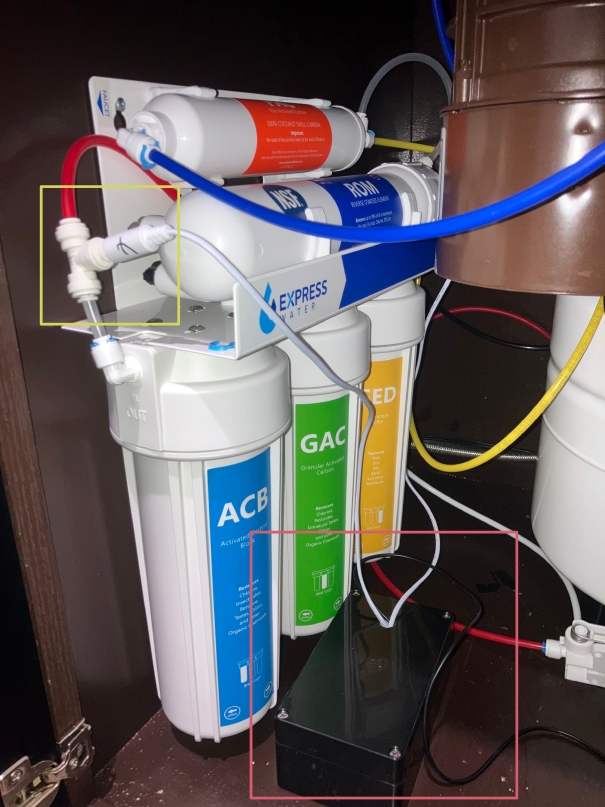
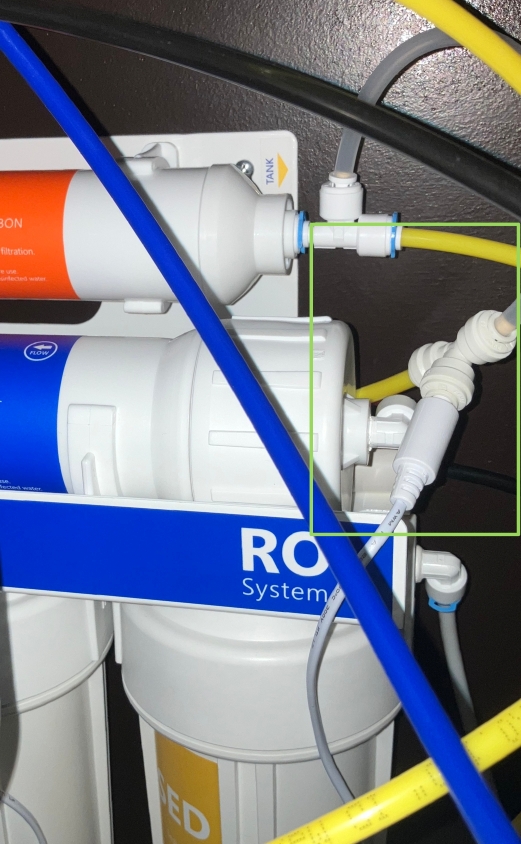
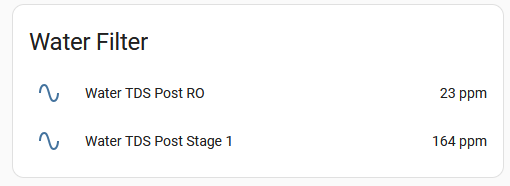
Through this project, I gained hands-on experience with microcontroller programming, sensor integration, and data visualization. One mistake I made initally was using a static IP address for the ESP32. This caused issues when I changed subnets and had to reconfigure the IP address. Using DHCP with a reserved address would have been a better approach so I dont have to crawl underneath my sink to reconfigure the device.
My home network has evolved significantly over the years, transitioning from a simple setup to a more complex and robust infrastructure. Currently, my network consists of multiple VLANs to separate different types of traffic, including a dedicated VLAN for IoT devices to enhance security, and a VLAN for some of my hosting services. I have a multple VPN services running to securely access my home network remotely and another to offer site to site connectivity. I wish to eventually add more about my network setup and diagram but first I need to filter out some sensitive information.
I plan to eventually move to OPNsense or pfSense for more advanced routing and firewall capabilities, as well as to have and IPS/IDS system in place to monitor and protect my network from potential threats. However, to make that happen I need to upgrade my current hardware for more powerful components that can handle the increased load.
This website is a personal project that I have been working on to showcase my skills and projects.